
For the whole chapter, we keep the LinearRegression from Training the first model and change only the columns we feed it.
Building those columns is called feature engineering. In the machine learning process, it’s step 6, the first step of the loop, and we will go around the loop several times. Every change gets judged on the year-by-year folds. Every change ends with a table that puts the new fold scores next to the old ones, so you can see what it earned. The 1980-1982 cars stay locked away until the end of the chapter (Rule 14).
One helper first, so we don’t repeat the same lines in every section. It scores a model on the folds and returns one RMSE per validation year.
def fold_rmse(model, X):
    scores = cross_val_score(model, X, y_train, cv=folds, scoring='neg_root_mean_squared_error')
    # Scikit-learn scorers follow "greater is better", so error metrics come back negated
    return pd.Series(-scores, index=range(75, 80)).rename_axis('validation year')
X_train still holds every column, including model year and car name. The folds are row positions computed from the model year, so whatever we pass as X must keep the same rows in the same order. Dropping columns is fine.
Where we start
Dropping the model year
The simplest transformation removes a column, and we have already picked one. The model year gave the Skodas 21 and 24 mpg of optimism nobody ever measured, because a straight line keeps adding 0.52 mpg per year long after the data ends. Every car we will ever predict sits past the end of that column.
So the starting point is the year-blind model. Here it is next to the model that still has the year, with the dummy model underneath (Rule 10).
from sklearn.dummy import DummyRegressor

year_blind = ['cylinders', 'displacement', 'horsepower', 'weight', 'acceleration', 'origin']

pd.DataFrame({
    'with year': fold_rmse(LinearRegression(), X_train[year_blind + ['model year']]),
    'year-blind': fold_rmse(LinearRegression(), X_train[year_blind]),
    'dummy': fold_rmse(DummyRegressor(), X_train[year_blind]),
}).to_markdown()
| validation year | with year | year-blind | dummy |
|---|---|---|---|
| 75 | 2.27129 | 2.28949 | 4.96901 |
| 76 | 2.59498 | 2.72774 | 6.19775 |
| 77 | 3.16841 | 3.686 | 7.49559 |
| 78 | 4.11339 | 4.56122 | 7.84034 |
| 79 | 3.81283 | 5.07838 | 8.01044 |
Dropping the year makes every fold worse. The average RMSE goes from 3.19 to 3.67, and the 1979 fold loses 1.27 mpg. Both models leave the dummy far behind (6.90 on average).
We drop the year anyway. Each fold asks only one question: train on the past, predict the next year. One year out, the trend the column learned is still running, so the column helps. The Skodas sit 40 years out, and no fold asks about anything that far away. The fold scores can’t settle this one, so we go with what the column did to the Skodas in the data drift section.
The year-blind model is the baseline every change in this chapter has to beat: 3.67 on average. Here are its errors.
from sklearn.base import clone

def fold_residuals(model, X):
    parts = []
    for train_rows, validation_rows in folds:
        fitted = clone(model).fit(X.iloc[train_rows], y_train.iloc[train_rows])
        # Actual minus predicted, so a positive value means the model understated the MPG
        parts.append(y_train.iloc[validation_rows] - fitted.predict(X.iloc[validation_rows]))
    return pd.concat(parts)

baseline_residuals = fold_residuals(LinearRegression(), X_train[year_blind])

plt.hist(baseline_residuals, bins=np.arange(-10, 18, 1))
plt.axvline(0, color='red')
plt.title('Year-blind model: errors on the 1975-1979 folds', loc='left')
plt.xlabel('actual - predicted [mpg]')
plt.ylabel('cars')
plt.show()
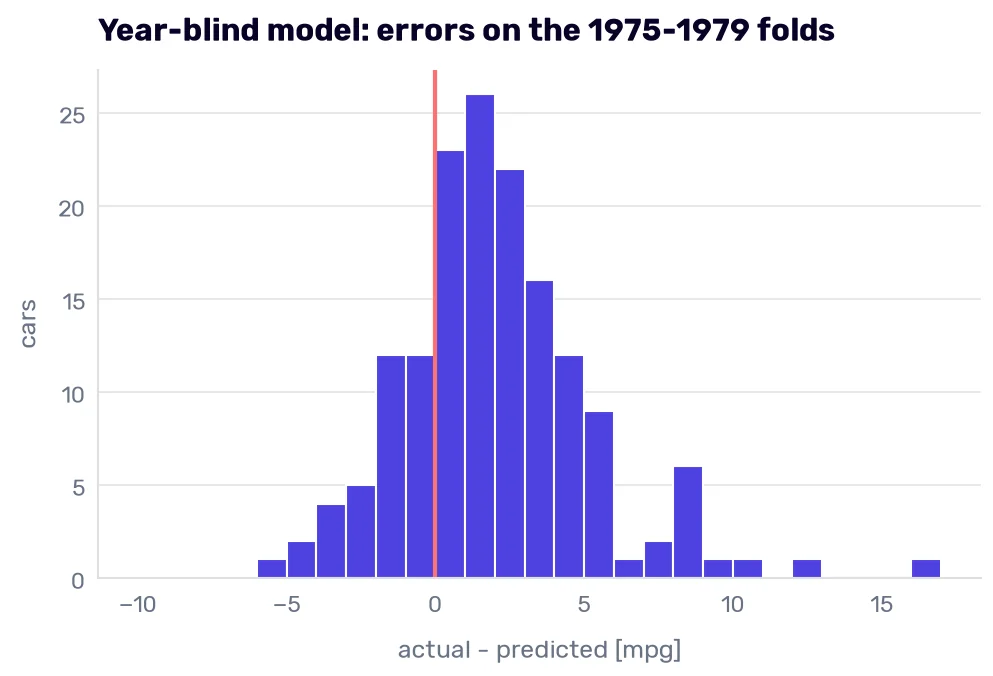
Each of the 157 cars from 1975-1979 appears once, predicted by a model trained only on the years before it. Three in four errors sit right of zero, where the model understated the MPG, and the average miss leans 2.02 mpg that way. The long tail on the right holds the cars we keep meeting: the Volkswagen Rabbit diesel at +16.2 mpg, the Datsun B210 GX at +12.1, and the Fiat Strada at +10.2.
Numbers that are categories
One-hot encoding the origin
In the first chapter, I complained that in our dataset, US + Europe = Japan. Here is what the year-blind model did with that.
model = LinearRegression().fit(X_train[year_blind], y_train)
pd.Series(model.coef_, index=year_blind).to_markdown()
| 0 | |
|---|---|
| cylinders | -0.224772 |
| displacement | 0.000681666 |
| horsepower | -0.04044 |
| weight | -0.00441617 |
| acceleration | -0.149432 |
| origin | 0.623622 |
The coefficient on origin is 0.62. A European car (2) gets 0.62 mpg more than an American one (1), and a Japanese car (3) gets 1.25 mpg more. The model had one number to spend on three regions, so Japan’s advantage over the USA had to be exactly twice Europe’s. Nobody measured that ratio. It follows from the order in which someone numbered the regions.
origin is a categorical variable: its values are labels from a fixed set (USA, Europe, Japan), with no order and no distance between them, even when the file stores them as numbers.
One-hot encoding removes the order. The origin column turns into one column per region, holding 1 in the car’s region and 0 everywhere else. Every region gets its own coefficient, and none of them has to sit between the other two.
Three columns would be one too many because of the dummy variable trap. Every car comes from exactly one region, so the three columns always add up to 1, which is exactly what the intercept multiplies. Add 5 mpg to every region’s coefficient, subtract 5 from the intercept, and every prediction stays the same. The model can’t tell which version is right (neither can you), so the individual coefficients stop meaning anything.
The fix is to drop one region. Its effect moves into the intercept, and the remaining coefficients mean “compared to the dropped region.” OneHotEncoder does it with the drop parameter. drop='first' drops the first category in alphabetical order, which would be Europe. I want to compare everything with the USA, the biggest group, so I name it.
from sklearn.preprocessing import OneHotEncoder

ORIGIN_NAMES = {1: 'USA', 2: 'Europe', 3: 'Japan'}
X_named = X_train.assign(origin=X_train['origin'].map(ORIGIN_NAMES))

encoder = OneHotEncoder(drop=['USA'], sparse_output=False)
encoded = pd.DataFrame(encoder.fit_transform(X_named[['origin']]),
                       columns=encoder.get_feature_names_out(), index=X_named.index)
encoded.join(X_named['origin']).drop_duplicates('origin').to_markdown()
| origin_Europe | origin_Japan | origin | |
|---|---|---|---|
| 0 | 0 | 0 | USA |
| 14 | 0 | 1 | Japan |
| 19 | 1 | 0 | Europe |
An American car gets all zeros, so whatever being American does to the MPG ends up hidden in the intercept.
Fitting the encoder inside the folds
The encoder learns something when we call fit(): the list of categories it has to make columns for. If you fit it on all 307 training cars before cross-validation, then in the 1975 fold it has already seen the cars from 1975-1979, which are supposed to be new to it. Every transformer that learns from the data has the same problem. Scaling, later in this chapter, learns a mean and a standard deviation.
So the encoder becomes part of the model. The machine learning process chapter introduced the Pipeline, and here is the first one. When cross_val_score fits a pipeline, it fits every step on the fold’s training rows only. In the fold that validates on 1975, the encoder learns from 1970-1974 only.
Inside the pipeline, a ColumnTransformer sends different columns to different steps. The numbers pass through untouched, origin goes to the encoder, and every column we don’t name (model year and car name) is dropped.
from sklearn.compose import ColumnTransformer
from sklearn.pipeline import make_pipeline

numeric = ['cylinders', 'displacement', 'horsepower', 'weight', 'acceleration']

one_hot_origin = make_pipeline(
    ColumnTransformer([
        ('numeric', 'passthrough', numeric),
        ('origin', OneHotEncoder(drop=['USA'], sparse_output=False), ['origin']),
    ], verbose_feature_names_out=False),
    LinearRegression(),
)

one_hot_origin.fit(X_named, y_train)
pd.Series(one_hot_origin[-1].coef_, index=one_hot_origin[0].get_feature_names_out()).to_markdown()
| 0 | |
|---|---|
| cylinders | -0.2291 |
| displacement | 0.000275851 |
| horsepower | -0.0401657 |
| weight | -0.00439423 |
| acceleration | -0.150889 |
| origin_Europe | 0.498409 |
| origin_Japan | 1.24959 |
Given the freedom, the model puts Europe 0.50 mpg above the USA and Japan 1.25 mpg above it. Japan’s advantage is two and a half times Europe’s instead of the forced two. Now, the folds.
pd.DataFrame({
    'numeric origin': fold_rmse(LinearRegression(), X_train[year_blind]),
    'one-hot origin': fold_rmse(one_hot_origin, X_named),
}).to_markdown()
| validation year | numeric origin | one-hot origin |
|---|---|---|
| 75 | 2.28949 | 2.29192 |
| 76 | 2.72774 | 2.81667 |
| 77 | 3.686 | 3.69986 |
| 78 | 4.56122 | 4.56869 |
| 79 | 5.07838 | 5.07613 |
After all this talk about regions, the one-hot model is 0.02 mpg worse on average. Not exactly the triumph I was hoping to show you.
So was the numeric version right after all? Renumber the regions (Japan = 1, USA = 2, Europe = 3) and train the numeric model again.
renumbered = X_train[year_blind].assign(origin=X_train['origin'].map({3: 1, 1: 2, 2: 3}))
fold_rmse(LinearRegression(), renumbered).mean(), LinearRegression().fit(renumbered, y_train).coef_[-1]
(np.float64(3.6222413350001803), np.float64(-0.33463102383859117))
It scores 3.62 on average, better than both models in the table. Its origin coefficient flips to −0.33, which now ranks European cars as the thirstiest, below the American ones. The original numbering put them between the USA and Japan.
The folds can’t referee this. Three regions can be numbered in six orders, but an order and its reverse give the same fit with the sign flipped, so that’s three different models with three different stories, and one of them will score best on the folds. Keeping it would be the winner’s curse: we would crown the coin that came up heads. One-hot encoding doesn’t win a single fold here, but it’s the only version whose answer doesn’t depend on a number somebody typed next to a name.
Cylinders: a number or a category?
cylinders holds only five values in the training data, so it could be a category too.
X_train['cylinders'].value_counts().sort_index().to_markdown()
| cylinders | count |
|---|---|
| 3 | 3 |
| 4 | 129 |
| 5 | 2 |
| 6 | 71 |
| 8 | 102 |
Look at what one-hot encoding would create. The 3-cylinder column would hold the three rotary Mazdas from the first chapter (the RX-2, the RX-3, and the RX-4), so “3 cylinders” would mean “rotary Mazda.” Its coefficient would come from three cars (Rule 7), and the Skodas, with three real cylinders each, would inherit it. The 5-cylinder column would hold an Audi 5000 and a Mercedes-Benz 300D, which is Rule 7 again.
As a number, 3 at least means “one fewer than 4,” which is true for every piston engine the model will ever see. The rotaries still pull on the slope, but three cars out of 307 can’t pull it far.
So cylinders stays a number. Encoding it wouldn’t solve the rotary problem anyway, because no column in this dataset tells a rotary engine from a piston engine.
Data extraction
The make hidden in the car name
We have ignored car name since the first chapter because it is almost unique per row. Its first word is the make, and there are far fewer makes than names.
make = X_train['car name'].str.split().str[0]
make.value_counts()
car name
ford             40
chevrolet        36
plymouth         26
amc              26
dodge            22
toyota           16
datsun           15
buick            14
pontiac          14
volkswagen       13
mercury          10
fiat              8
oldsmobile        8
peugeot           7
honda             6
audi              5
volvo             5
chrysler          4
opel              4
saab              4
mazda             3
renault           3
chevy             2
bmw               2
maxda             2
subaru            2
vw                2
cadillac          2
hi                1
toyouta           1
chevroelt         1
capri             1
mercedes-benz     1
mercedes          1
Name: count, dtype: int64
That’s 34 strings, and the problems sit at the bottom of the list.
Same make, different spelling
“chevy”, “chevroelt”, and “chevrolet” are one make. So are “vw” and “volkswagen”, “maxda” and “mazda”, “toyouta” and “toyota”, and “mercedes” and “mercedes-benz” (the name “mercedes benz 300d” splits on the space). We have seen this before (Rule 8), and it won’t be the last time.
Two more need knowledge about cars. “hi” is International Harvester, the 1200D pickup truck we found in the first chapter. “capri” is the Capri II, which Mercury dealers sold in the US.
I once used topic modeling to find out what people write in hotel reviews. Our first iteration discovered they write about… hotels. Digging deeper gave us rooms, amenities, service, and location. Not the groundbreaking insight I was hoping for. The fix was in the cleaning step. A topic model needs the stop words removed first, the words so common they carry no meaning (“and,” “or,” “the”). We added our own domain stop words to the standard list, and the topics sharpened from rooms to room cleanliness (or the lack of it). The off-the-shelf list couldn’t know which words were empty in hotel reviews.
Car makes work the same way. A fuzzy string matcher would catch “chevroelt” and “toyouta”. It would never connect “chevy” with “chevrolet” or “capri” with “mercury”, because those strings have almost nothing in common. So I wrote the mapping by hand, after reading every make on the list.
MAKE_SPELLINGS = {
    'chevy': 'chevrolet', 'chevroelt': 'chevrolet', 'maxda': 'mazda', 'toyouta': 'toyota',
    'vw': 'volkswagen', 'mercedes': 'mercedes-benz',
    'hi': 'international harvester', 'capri': 'mercury',
}

def add_make(X):
    return X.assign(make=X['car name'].str.split().str[0].replace(MAKE_SPELLINGS))

X_make = add_make(X_train)
X_make['make'].nunique()
27
The 34 strings become 27 makes. add_make doesn’t learn anything when it runs, so it can sit outside the pipeline for now, which lets permutation importance shuffle the make as one column later. The model we ship can’t depend on the caller remembering to run it, so in the full pipeline at the end of the chapter it becomes the first step. I built the dictionary by reading all 307 training names, including the validation years, but it uses no MPG values, and a spelling fix means the same thing in every year.
I didn’t read the 1980s names. That’s Rule 14, and a misspelling we haven’t seen will be treated as a make we haven’t seen.
Rare makes and makes the model has never seen
Of the 27 makes, 16 have fewer than 10 cars, and nine have fewer than five. Inside a fold, it gets worse. The 1975 fold trains on 150 cars from 1970-1974.
That’s two problems. A make with two cars gets a coefficient fitted on two cars (Rule 7). And a make can show up in a validation year without ever appearing in the years before it: the 1976 fold meets a Mercedes-Benz 280S and a Cadillac Seville for the first time. By default (handle_unknown='error'), the encoder stops with an error when it sees a make it doesn’t know.
OneHotEncoder handles both. min_frequency=10 puts every make with fewer than 10 cars in the fold’s training rows into one shared column, the infrequent bucket. handle_unknown='infrequent_if_exist' sends a make the encoder has never seen into the same bucket. In scikit-learn 1.9, it also prints a warning each time it happens, and our folds trigger it, so you will see the warning when you run the code. drop='first' drops AMC, the first make alphabetically, so every make coefficient is measured against AMC.
Why 10? A make’s coefficient is the average of what is left over on its cars, and Rule 7 says how much an average of three cars is worth. With min_frequency=3, the fold scores average 3.74, worse than the origin. With 10, the 1975 fold keeps only Chevrolet, Ford, Plymouth, and Toyota, and every other make shares the bucket.
The make replaces the origin. Every make in our data comes from a single region, so the make already carries the origin.
def make_model(columns, numeric_step='passthrough'):
    return make_pipeline(
        ColumnTransformer([
            ('numeric', numeric_step, columns),
            ('make', OneHotEncoder(drop='first', min_frequency=10,
                                   handle_unknown='infrequent_if_exist', sparse_output=False), ['make']),
        ], verbose_feature_names_out=False),
        LinearRegression(),
    )

pd.DataFrame({
    'one-hot origin': fold_rmse(one_hot_origin, X_named),
    'make': fold_rmse(make_model(numeric), X_make),
}).to_markdown()
| validation year | one-hot origin | make |
|---|---|---|
| 75 | 2.29192 | 2.39544 |
| 76 | 2.81667 | 2.65368 |
| 77 | 3.69986 | 3.38418 |
| 78 | 4.56869 | 4.41269 |
| 79 | 5.07613 | 4.69113 |
Finally, something that pays: the average falls from 3.69 to 3.51, and four folds out of five improve. The 1975 fold gets worse, which is what four makes and a bucket learned from 150 cars look like.
Now, the leak from Fitting the encoder inside the folds, with something to leak this time. An encoder fitted on all 307 cars before the folds counts the makes in the validation years too. Mercury has 11 cars in the training data, but never more than nine before any validation year. The leaky encoder gives Mercury its own column in every fold anyway.
leaky_encoder = OneHotEncoder(drop='first', min_frequency=10,
                              handle_unknown='infrequent_if_exist', sparse_output=False)
X_leaky = np.hstack([X_make[numeric], leaky_encoder.fit_transform(X_make[['make']])])

pd.DataFrame({
    'encoder inside the folds': fold_rmse(make_model(numeric), X_make),
    'encoder fitted on all 307 cars': fold_rmse(LinearRegression(), X_leaky),
}).to_markdown()
| validation year | encoder inside the folds | encoder fitted on all 307 cars |
|---|---|---|
| 75 | 2.39544 | 2.48389 |
| 76 | 2.65368 | 2.66139 |
| 77 | 3.38418 | 3.45351 |
| 78 | 4.41269 | 4.42326 |
| 79 | 4.69113 | 4.63567 |
The leak made four folds worse and one better, so it doesn’t even flatter the model here. You can’t tell in advance which way a leak pushes the score, and a leaky score stops measuring what the model will do in production.
One more car before we move on. The Volkswagen Rabbit diesel is still our worst miss, and its name says “diesel”. We could extract a diesel flag from the name, but only one name in the 1970s has the word. The 1978 fold trains on 1970-1977, where the flag would be 0 for every car, so the flag can’t help the fold that made us want it. In the folds that could use it, its coefficient would come from one car. We leave the word in the name.
Multicollinearity
The correlation matrix
In the first chapter, I said that heavier cars tend to have more cylinders, more displacement, and more horsepower. Correlation measures how close two columns come to a straight-line relationship, from −1 to 1. It doesn’t depend on units, so we can compute it on the raw columns.
corr = X_train[numeric].join(y_train).corr()

fig, ax = plt.subplots(figsize=(8, 6))
image = ax.imshow(corr.abs(), cmap='Purples', vmin=0, vmax=1)
ax.set_xticks(range(len(corr)), corr.columns, rotation=45, ha='right')
ax.set_yticks(range(len(corr)), corr.index)
for i in range(len(corr)):
    for j in range(len(corr)):
        ax.text(j, i, f'{corr.iloc[i, j]:.2f}', ha='center', va='center')
ax.set_title('Correlation between the columns (training data)', loc='left')
fig.colorbar(image, label='strength of correlation (absolute value)')
plt.show()
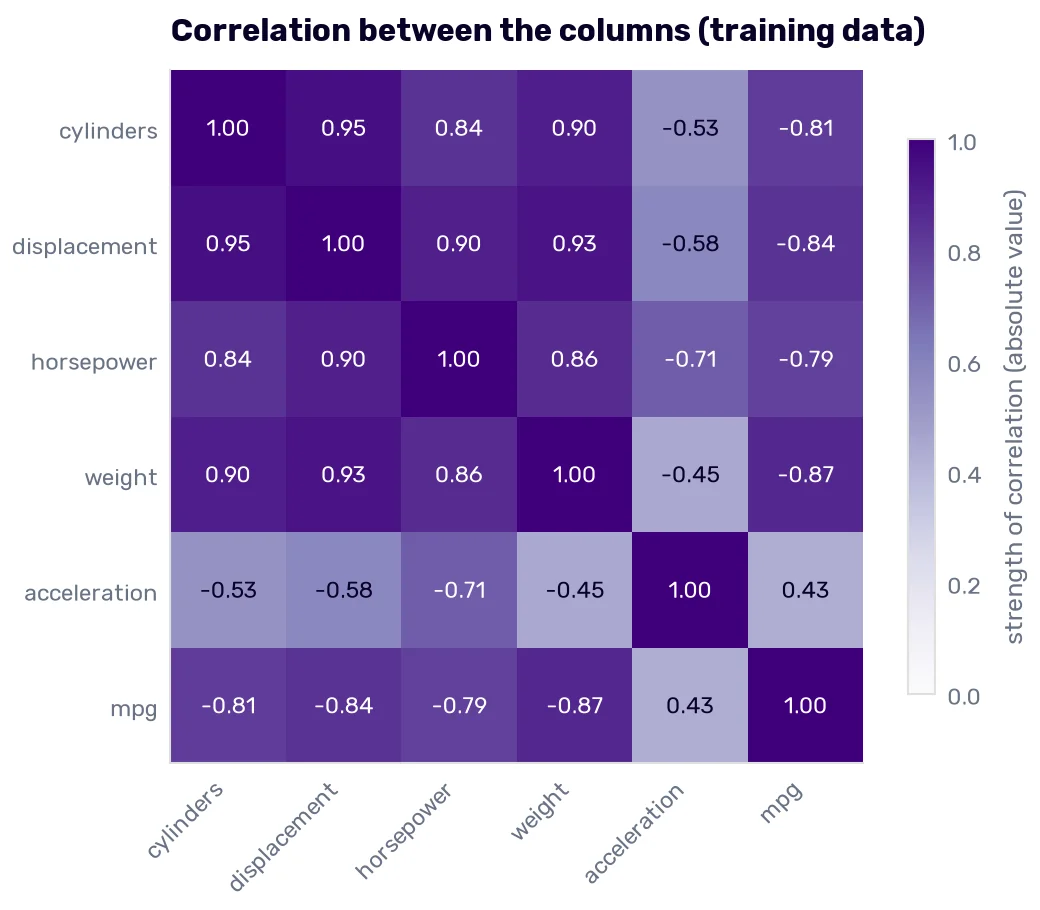
The color shows the strength, and the number shows the direction. Cylinders, displacement, horsepower, and weight form a dark block, with every pair between 0.84 and 0.95, because all four grow with the size of the car. Displacement and cylinders reach 0.95. Acceleration runs the other way, most strongly against horsepower (−0.71), which makes sense, because a bigger number means a slower car.
Why the displacement coefficient points the wrong way
In the feature importance section, the coefficient on displacement was positive, as if a bigger engine drove more miles on a gallon. Our current model, with the make, agrees: +0.0056 mpg per cubic inch. With displacement as the only column, the sign is the one everybody expects.
LinearRegression().fit(X_train[['displacement']], y_train).coef_
array([-0.05002353])
Now, fit the current model once per fold, on the years before each validation year, and print the coefficients.
coefficients = {}
for (train_rows, _), year in zip(folds, range(75, 80)):
    fitted = clone(make_model(numeric)).fit(X_make.iloc[train_rows], y_train.iloc[train_rows])
    coefficients[year] = pd.Series(fitted[-1].coef_[:len(numeric)], index=numeric)

pd.DataFrame(coefficients).to_markdown()
| 75 | 76 | 77 | 78 | 79 | |
|---|---|---|---|---|---|
| cylinders | -0.107729 | -0.181241 | -0.152765 | -0.143197 | -0.120438 |
| displacement | -0.000645909 | -0.00544342 | -0.00302271 | -0.00261025 | 0.0029674 |
| horsepower | -0.0280835 | -0.0267169 | -0.0375024 | -0.0379281 | -0.0433136 |
| weight | -0.00399158 | -0.00350376 | -0.00367733 | -0.00389865 | -0.00453014 |
| acceleration | -0.0561867 | -0.143072 | -0.180991 | -0.178311 | -0.123768 |
Weight and horsepower keep their sign in every fold. Displacement is negative four times and positive once. The flip happens as soon as the 1978 cars join the training data.
Imagine the dataset held displacement twice, as two identical columns. Any pair of coefficients with the same sum would give identical predictions: −0.05 and 0, or +1 and −1.05. The data pins down the sum and says nothing about the split. Our columns aren’t identical, but at 0.93 to 0.95 they come close. The sum of their effects is pinned down by the large differences between big and small cars. The split between them is decided by the small differences between, say, two cars with the same weight and different engines, and those differences are mostly noise. When you train on different years, the noise is different, so the split moves with it. The predictions barely move, because the sum barely moves.
So the positive coefficient on displacement only tells us that, once weight, cylinders, and horsepower took their share, the leftover noise leaned positive in those years.
Choosing what to keep
To choose which columns from the block stay, we use permutation importance again, with two changes from the feature importance section. It runs on the folds instead of the test set, once per validation year, on a model trained on the years before it. And it uses the RMSE scorer, so the importance is the number of mpg the RMSE grows when we shuffle a column. (The default R² is tied to the rows being scored, and every fold scores different rows.)
from sklearn.inspection import permutation_importance

importances = {}
for (train_rows, validation_rows), year in zip(folds, range(75, 80)):
    fitted = clone(make_model(numeric)).fit(X_make.iloc[train_rows], y_train.iloc[train_rows])
    result = permutation_importance(
        fitted, X_make.iloc[validation_rows][numeric + ['make']], y_train.iloc[validation_rows],
        scoring='neg_root_mean_squared_error', n_repeats=30, random_state=42,
    )
    importances[year] = pd.Series(result.importances_mean, index=numeric + ['make'])

importances = pd.DataFrame(importances)
importances['mean'] = importances.mean(axis=1)
importances.sort_values('mean', ascending=False).to_markdown()
| 75 | 76 | 77 | 78 | 79 | mean | |
|---|---|---|---|---|---|---|
| weight | 2.4226 | 2.73679 | 3.01363 | 2.01723 | 2.72353 | 2.58276 |
| horsepower | 0.0487012 | 0.569722 | 0.82726 | 0.715967 | 0.639137 | 0.560157 |
| make | 0.432337 | 0.130015 | 0.0591345 | 0.260184 | 0.231731 | 0.22268 |
| cylinders | 0.0252214 | 0.119124 | 0.0822939 | 0.074081 | 0.0748113 | 0.0751063 |
| displacement | 0.00560045 | 0.219462 | 0.105683 | 0.0760468 | -0.0759753 | 0.0661635 |
| acceleration | 0.0534897 | 0.0323547 | -0.0369332 | -0.0969944 | 0.0428385 | -0.00104893 |
Shuffling the weight makes the RMSE 2.58 mpg worse on average. Weight does most of the work in every fold. Horsepower and the make follow. Cylinders and displacement add less than 0.1 mpg each, and displacement hurts the 1979 fold.
The table doesn’t decide on its own, because shuffling one column of a correlated block leaves its neighbors in place to cover for it. Add what we know about the two weakest columns. cylinders carries the rotary problem, and displacement is the column the Skodas fall outside of. Both are near copies of weight and horsepower, and Rule 15 says their coefficients can’t be read anyway. So we drop both.
Acceleration scores zero too, but it’s the only column outside the block. Dropping it as well costs 0.02 mpg on average, so it stays.
kept = ['horsepower', 'weight', 'acceleration']

pd.DataFrame({
    'all five': fold_rmse(make_model(numeric), X_make),
    'without cylinders and displacement': fold_rmse(make_model(kept), X_make),
}).to_markdown()
| validation year | all five | without cylinders and displacement |
|---|---|---|
| 75 | 2.39544 | 2.43116 |
| 76 | 2.65368 | 2.64345 |
| 77 | 3.38418 | 3.35949 |
| 78 | 4.41269 | 4.3759 |
| 79 | 4.69113 | 4.68947 |
Two columns fewer, and the average RMSE goes from 3.51 to 3.50. Not a groundbreaking result yet, but let’s test more options.
Here are the new errors next to the baseline’s.
improved_residuals = fold_residuals(make_model(kept), X_make)

bins = np.arange(-10, 18, 1)
plt.hist(baseline_residuals, bins=bins, alpha=0.55, label='year-blind baseline')
plt.hist(improved_residuals, bins=bins, alpha=0.55, label='make + selected columns')
plt.axvline(0, color='red')
plt.title('Errors on the 1975-1979 folds, before and after', loc='left')
plt.xlabel('actual - predicted [mpg]')
plt.ylabel('cars')
plt.legend()
plt.show()
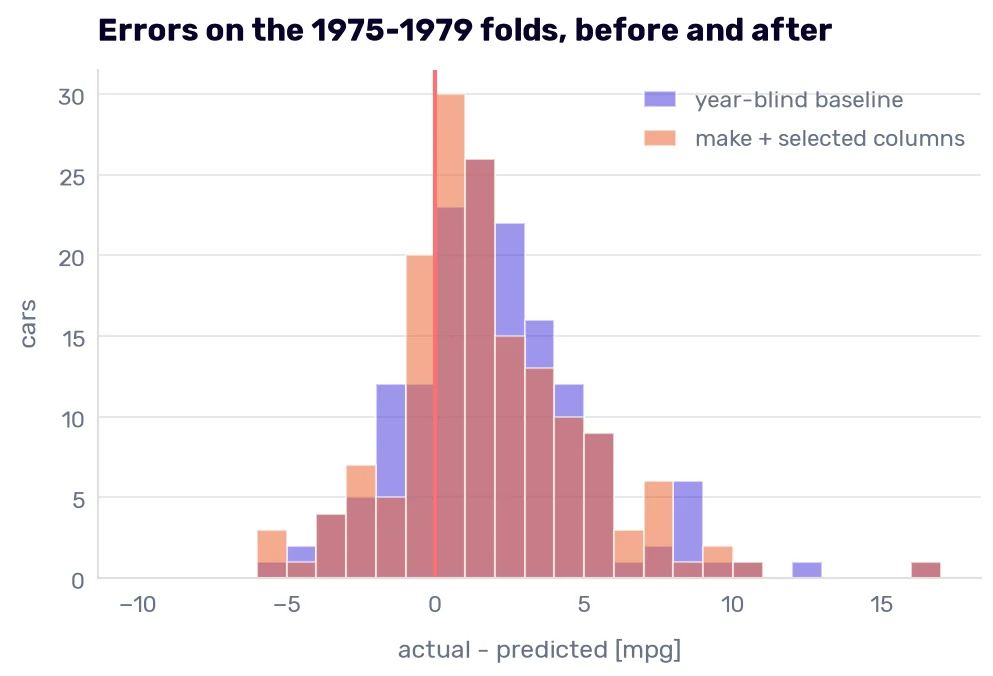
The center moved toward zero, and the tail got shorter. Misses above 8 mpg went from 10 cars to five. The lean barely changed: three in four errors still understate the MPG, and the average lean went from 2.02 to 1.80 mpg. The 1979 fold still misses by 3.60 mpg on average. Better columns can’t tell the model that 1979 cars are more efficient than 1970s cars of the same weight. The Rabbit diesel is still on the far right.
Scaling
Standardization
In the feature importance section, I promised we would standardize the inputs, so comparing coefficients makes more sense. Standardization subtracts the column’s mean and divides by its standard deviation:
\[z = \frac{x - \mu}{\sigma}\]Here, \(\mu\) and \(\sigma\) are the mean and the standard deviation of the column in the training data. Every standardized column has a mean of 0 and a standard deviation of 1. StandardScaler learns \(\mu\) and \(\sigma\) in fit(), so it goes inside the pipeline, where each fold computes them from its own training rows.
from sklearn.preprocessing import StandardScaler

pd.DataFrame({
    'raw': fold_rmse(make_model(kept), X_make),
    'standardized': fold_rmse(make_model(kept, StandardScaler()), X_make),
}).to_markdown()
| validation year | raw | standardized |
|---|---|---|
| 75 | 2.43116 | 2.43116 |
| 76 | 2.64345 | 2.64345 |
| 77 | 3.35949 | 3.35949 |
| 78 | 4.3759 | 4.3759 |
| 79 | 4.68947 | 4.68947 |
The two columns agree to the last printed digit. (Strictly speaking, they differ by about 0.00000000000002 mpg, which is floating-point rounding and nothing to lose sleep over.)
If we measured weight in tons instead of pounds, the model would multiply it by a coefficient 2,000 times larger. The product is the same, and so is the prediction. Subtracting the mean shifts every value by the same amount, and the intercept absorbs the shift. For a plain linear regression, scaling changes the coefficients and nothing else.
The coefficients do change:
raw_model = make_model(kept).fit(X_make, y_train)
standardized_model = make_model(kept, StandardScaler()).fit(X_make, y_train)

pd.DataFrame({
    'raw': raw_model[-1].coef_,
    'standardized': standardized_model[-1].coef_,
}, index=raw_model[0].get_feature_names_out()).to_markdown()
| raw | standardized | |
|---|---|---|
| horsepower | -0.056916 | -2.27801 |
| weight | -0.00422249 | -3.71607 |
| acceleration | -0.222308 | -0.611682 |
| make_buick | 3.24359 | 3.24359 |
| make_chevrolet | 1.5955 | 1.5955 |
| make_datsun | 4.92706 | 4.92706 |
| make_dodge | 3.15755 | 3.15755 |
| make_ford | 1.115 | 1.115 |
| make_mercury | 1.32015 | 1.32015 |
| make_plymouth | 2.20367 | 2.20367 |
| make_pontiac | 4.33885 | 4.33885 |
| make_toyota | 1.97808 | 1.97808 |
| make_volkswagen | 2.90043 | 2.90043 |
| make_infrequent_sklearn | 3.01843 | 3.01843 |
A raw coefficient is mpg per pound, per horsepower, or per second, and you can’t put those side by side. A standardized coefficient is mpg per standard deviation of the column. One standard deviation of weight (880 lbs1) costs 3.72 mpg. One standard deviation of horsepower (40 hp) costs 2.28. One of acceleration (2.75 s) costs 0.61. Now the three numbers are comparable, and they agree with the permutation importance about the order.
Two warnings. Rule 15 still applies: horsepower and weight correlate at 0.86, so their split isn’t fully stable either. And the make coefficients didn’t change, because the scaler never touched the make columns. A make coefficient is the effect of switching a 0 to a 1 compared to AMC, a different unit from “one standard deviation,” so don’t rank the makes against the numbers.
Plain linear regression is the exception, though. Algorithms that measure the distance between rows, or penalize large coefficients, give different predictions when you change the scale of a column, and so does the PCA I still owe you. We will meet all of them later, and every one of them will get its scaler inside the pipeline.
Min-max scaling
Min-max scaling squeezes every column into the range from 0 to 1:
\[x' = \frac{x - \min}{\max - \min}\]MinMaxScaler learns the minimum and the maximum in fit(). For our model, it changes nothing either.
from sklearn.preprocessing import MinMaxScaler

(fold_rmse(make_model(kept, MinMaxScaler()), X_make) - fold_rmse(make_model(kept), X_make)).abs().max()
np.float64(1.4654943925052066e-14)
The difference is in what decides the scale. Standardization uses the mean and the standard deviation, which every car shares in. Min-max scaling uses two cars. In our training data, the heaviest car is the 1971 Pontiac Safari station wagon (5140 lbs) and the lightest is the 1971 Datsun 1200 (1613 lbs). Every weight gets measured against those two. If one heavier car joins the training data, every scaled weight moves.
New data can also land outside the range. Take the column we just dropped, because it shows the problem best. The Skodas’ 61-cubic-inch engines are smaller than anything in the training data.
skodas = pd.DataFrame({'displacement': [60.9, 60.9]}, index=['citigo', 'scala'])

pd.DataFrame({
    'min-max': MinMaxScaler().fit(X_train[['displacement']]).transform(skodas)[:, 0],
    'standardized': StandardScaler().fit(X_train[['displacement']]).transform(skodas)[:, 0],
}, index=skodas.index).to_markdown()
| min-max | standardized | |
|---|---|---|
| citigo | -0.0183463 | -1.40249 |
| scala | -0.0183463 | -1.40249 |
Standardized, the Skodas get −1.40, an ordinary value that tells nobody anything. Min-max scaled, they get −0.018, a number that is supposed to be impossible. MinMaxScaler has a clip=True option that would turn it into 0. It keeps the column in range and hides the one sign that the car is something the model has never seen.
Normalization
Rule 6 told you to normalize before you read a trend, and the drift metrics footnote said the same about the Wasserstein distance. Both use the everyday sense of the word: divide by something so two numbers become comparable. Scikit-learn uses the word for something narrower, and the two senses get mixed up all the time.
Normalizer rescales each row (each car), so the row’s values, read as a vector, have a length of 1. Here is the Chevelle Malibu from the first row of the dataset, and an imaginary car with half its horsepower, half its weight, and half its acceleration time.
chevelle = X_train[kept].iloc[[0]]
two_cars = pd.concat([chevelle, chevelle / 2])
two_cars.to_markdown()
| horsepower | weight | acceleration | |
|---|---|---|---|
| 0 | 130 | 3504 | 12 |
| 0 | 65 | 1752 | 6 |
from sklearn.preprocessing import Normalizer

pd.DataFrame(Normalizer().fit_transform(two_cars), columns=kept).to_markdown()
| horsepower | weight | acceleration | |
|---|---|---|---|
| 0 | 0.0370747 | 0.999307 | 0.00342228 |
| 1 | 0.0370747 | 0.999307 | 0.00342228 |
After normalization, the two cars become the same row. Normalization keeps the direction of the row and throws away its size, and for cars, the size is the information. Weight, in the thousands, also takes 99.9% of every row, so the other columns all but vanish.
pd.DataFrame({
    'standardized': fold_rmse(make_model(kept, StandardScaler()), X_make),
    'normalized': fold_rmse(make_model(kept, Normalizer()), X_make),
}).to_markdown()
| validation year | standardized | normalized |
|---|---|---|
| 75 | 2.43116 | 2.7621 |
| 76 | 2.64345 | 3.51954 |
| 77 | 3.35949 | 3.46871 |
| 78 | 4.3759 | 4.34074 |
| 79 | 4.68947 | 6.18344 |
The average RMSE grows from 3.50 to 4.05, and the 1979 fold misses by 6.18 mpg. Normalization is for data where only the proportions matter. Two articles about the same topic produce word counts that point the same way, and the longer article just has bigger numbers.
From here on, the book uses one name per operation. Scaling is the umbrella term for changing a column’s units. Standardization subtracts the mean and divides by the standard deviation. Min-max scaling squeezes a column into a fixed range. Normalization means what Normalizer does: each row rescaled to a length of 1. Rule 6 keeps its everyday sense, because it is about reading charts, and no transformer is involved.
The year-blind model started at 3.67, and we are at 3.50. The model that still has the year scores 3.19. Our errors lean right in every fold, because a 1979 car goes further on a gallon than a 1975 car of the same weight, and none of our columns can tell them apart.
Dimensionality reduction with PCA
What PCA does to correlated columns
We dropped two columns of the correlated block by hand. Principal component analysis (PCA) keeps all five and rotates them into new columns, the principal components, which are uncorrelated with each other by construction. (If you remember eigenvectors from your linear algebra course, this is where they finally pay rent. I had to relearn them because I forgot about them five minutes after leaving the classroom.)
The first component points in the direction where the standardized data spreads the most. The second points where it spreads the most among the directions left, at a right angle to the first, and so on. PCA measures spread in the units of each column, so it needs standardized input. Without it, weight (in the thousands) would dominate the first component just because of its units.
from sklearn.decomposition import PCA

pca = make_pipeline(StandardScaler(), PCA()).fit(X_train[numeric])
pca[-1].explained_variance_ratio_
array([0.82067706, 0.13179075, 0.02711079, 0.01306434, 0.00735706])
The first component carries 82% of the variance in the five columns. Together with the second, it’s 95%. Scikit-learn names the components pca0 to pca4, so pca0 is the first component. Their weights on the five columns:
pd.DataFrame(pca[-1].components_, columns=numeric, index=pca[-1].get_feature_names_out()).to_markdown()
| cylinders | displacement | horsepower | weight | acceleration | |
|---|---|---|---|---|---|
| pca0 | 0.466733 | 0.4807 | 0.470804 | 0.459623 | -0.343772 |
| pca1 | 0.236998 | 0.179079 | -0.128508 | 0.358577 | 0.875597 |
| pca2 | -0.6376 | -0.184654 | 0.659002 | 0.302548 | 0.183165 |
| pca3 | -0.280802 | -0.0870625 | -0.550813 | 0.727333 | -0.284889 |
| pca4 | -0.490519 | 0.833775 | -0.155402 | -0.199051 | 0.0209517 |
The first component weighs cylinders, displacement, horsepower, and weight almost equally, and acceleration against them. It’s the “big car” direction from the correlation matrix, turned into one column. The second component is mostly acceleration: a slow car for its size scores high. The last three components hold what’s left, 5% of the variance together.
Fewer columns, same information?
Two components hold 95% of the variance. To see whether they can replace five columns, we score every number of components on the folds, with the make next to them as before.
scores = {'handpicked three': fold_rmse(make_model(kept, StandardScaler()), X_make)}
for k in range(1, 6):
    pca_step = make_pipeline(StandardScaler(), PCA(n_components=k))
    scores[f'{k} components'] = fold_rmse(make_model(numeric, pca_step), X_make)

pd.DataFrame(scores).to_markdown()
| validation year | handpicked three | 1 components | 2 components | 3 components | 4 components | 5 components |
|---|---|---|---|---|---|---|
| 75 | 2.43116 | 2.9361 | 2.21131 | 2.20575 | 2.36975 | 2.39544 |
| 76 | 2.64345 | 3.23375 | 2.76055 | 2.65055 | 2.66334 | 2.65368 |
| 77 | 3.35949 | 3.92109 | 3.64743 | 3.49841 | 3.38908 | 3.38418 |
| 78 | 4.3759 | 4.78996 | 4.73272 | 4.52669 | 4.43167 | 4.41269 |
| 79 | 4.68947 | 5.42527 | 5.01677 | 4.61112 | 4.69962 | 4.69113 |
On average, one component scores 4.06, two score 3.67, three score 3.50, and five score 3.51. Five components are a rotation of all five standardized columns, so they reproduce, to the last digit, the all-five model from Choosing what to keep.
The first component carries 82% of the variance and loses to the handpicked columns by more than half an mpg. PCA ranks directions by how much the inputs spread along them. It never sees the MPG, so it can’t know which directions predict it. Here, the third component (3% of the variance) brings the score from 3.67 down to 3.50.
Three components tie the handpicked three, 3.4985 against 3.4999, so the coefficients decide. A coefficient on weight is mpg per pound. A coefficient on the third component is mpg per unit of “−0.64 cylinders, +0.66 horsepower, +0.30 weight, and a bit of the rest,” and nobody can check that against what they know about cars. We keep the three columns. PCA comes back at the end of the chapter, where we need a picture more than a model.
Transforming nonlinear data
The bend in the residuals
In the data drift section, I said the true relationship between weight and MPG bends. Our model can’t bend. It’s linear in whatever columns we hand it, and no encoding or scaling changes that. Here are the fold errors, grouped by weight.
residuals = fold_residuals(make_model(kept, StandardScaler()), X_make)
bands = pd.cut(X_train['weight'], [1500, 2200, 2600, 3000, 3500, 4000, 5200])
residuals.groupby(bands, observed=True).agg(['mean', 'count']).to_markdown()
| weight | mean | count |
|---|---|---|
| (1500, 2200] | 5.29201 | 34 |
| (2200, 2600] | 1.30412 | 19 |
| (2600, 3000] | 0.694794 | 24 |
| (3000, 3500] | 0.262358 | 33 |
| (3500, 4000] | 0.707291 | 28 |
| (4000, 5200] | 1.71377 | 19 |
The drift pushes every band above zero. On top of it, the errors form a U. The model understates the lightest cars by 5.29 mpg on average, the cars around 3,250 lbs by 0.26, and the heaviest ones by 1.71 again. A straight line through a curve misses both ends of it in the same direction.
Gallons per 100 miles instead of miles per gallon
Moving a heavier car takes more fuel per mile, and the fuel per mile grows roughly in a straight line with the weight. MPG is 1 divided by fuel per mile, and a line can’t follow 1/x.
So we change the target. Gallons per 100 miles is 100 divided by MPG. A 25-mpg car burns 4 gal/100 mi, and a 12.5-mpg car burns 8. Train the model on that and convert each prediction back to mpg. TransformedTargetRegressor does both: it applies func to the target before fitting and inverse_func to every prediction. Dividing 100 by a number is its own inverse, so one function does both jobs.
from sklearn.compose import TransformedTargetRegressor

def gallons_per_100_miles(y):
    return 100 / y

reciprocal = TransformedTargetRegressor(
    regressor=make_model(kept, StandardScaler()),
    func=gallons_per_100_miles,
    inverse_func=gallons_per_100_miles,
)

pd.DataFrame({
    'mpg target': fold_rmse(make_model(kept, StandardScaler()), X_make),
    'gal/100 mi target': fold_rmse(reciprocal, X_make),
}).to_markdown()
| validation year | mpg target | gal/100 mi target |
|---|---|---|
| 75 | 2.43116 | 2.28193 |
| 76 | 2.64345 | 2.71561 |
| 77 | 3.35949 | 3.09116 |
| 78 | 4.3759 | 4.18162 |
| 79 | 4.68947 | 4.37335 |
The average falls from 3.50 to 3.33, almost as much as the make earned, and four folds out of five improve.
reciprocal_residuals = fold_residuals(reciprocal, X_make)

plt.scatter(X_train.loc[residuals.index, 'weight'], residuals, alpha=0.35, label='mpg target, each car')
for errors, label in [(residuals, 'mpg target'), (reciprocal_residuals, 'gal/100 mi target')]:
    by_band = pd.DataFrame({'weight': X_train['weight'], 'error': errors}).dropna().groupby(bands, observed=True).mean()
    plt.plot(by_band['weight'], by_band['error'], marker='o', label=f'{label}, band mean')
plt.axhline(0, color='red')
plt.title('Errors on the 1975-1979 folds against weight', loc='left')
plt.xlabel('weight [lbs]')
plt.ylabel('actual - predicted [mpg]')
plt.legend()
plt.show()
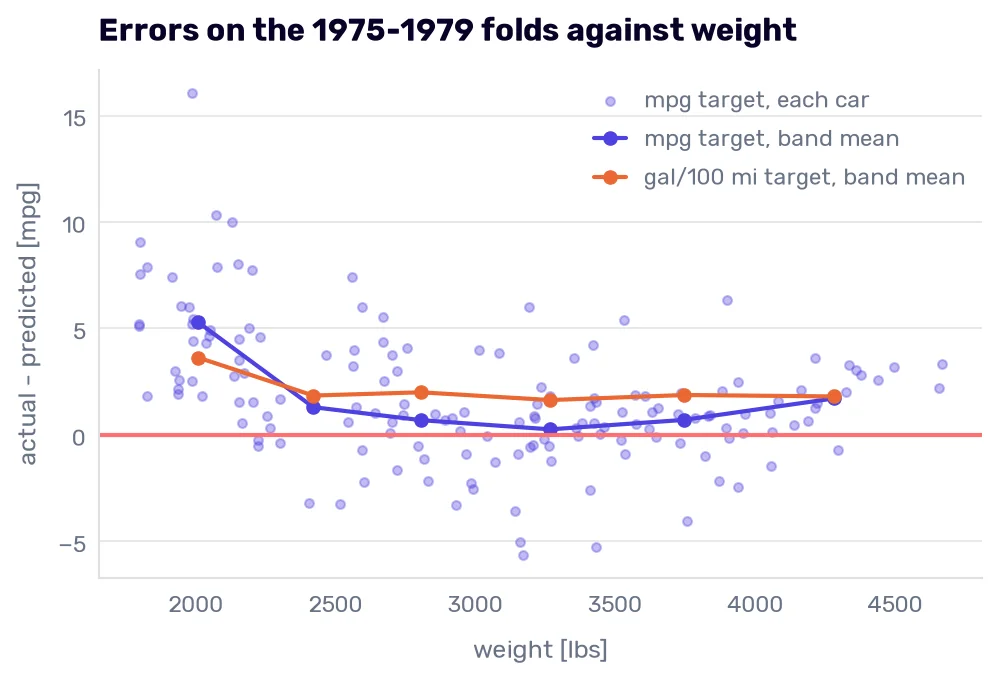
Most of the U is gone: the lightest band drops from 5.29 to 3.63, and the other five sit between 1.64 and 2.00.
Look at the height of the new line, though. Every band above 2,200 lbs moved up. Across all folds, the average lean grows from 1.80 to 2.21 mpg. The new model understates the MPG of more cars than the old one, while missing the light cars by less.
Scoring a transformed target
A transformed target comes with two traps, and the second one is behind that lean.
The first is scoring in the wrong units. If you train the model on gallons per 100 miles without the wrapper, cross_val_score reports its RMSE in gallons per 100 miles.
gallons = gallons_per_100_miles(y_train)
-cross_val_score(make_model(kept, StandardScaler()), X_make, gallons, cv=folds, scoring='neg_root_mean_squared_error')
array([0.76926264, 0.70776946, 0.64215161, 0.6192088 , 0.90259364])
An average of 0.73, next to a column of numbers around 3.5. It looks like a model more than four times better, and it’s a different unit. The same thing happened with R² in the metrics section: convert predictions back to mpg before you score them. TransformedTargetRegressor does that for us, which is why every table in this chapter stays comparable.
The second is that converting back costs something. A least-squares line predicts the average of the target, and here the target is gallons per 100 miles. Converted to mpg, an average of gallons per 100 miles comes out lower than the average MPG.
y_train.mean(), 100 / gallons_per_100_miles(y_train).mean()
(np.float64(21.084364820846904), np.float64(19.20539729282242))
The training cars average 21.08 mpg. Their average in gallons per 100 miles, converted back, gives 19.21 mpg. Dividing 100 by a number bends the scale, so averaging before and after the conversion gives different answers. Statisticians call this Jensen’s inequality. The size of the gap depends on how far the target spreads around the number being converted. Over the whole training set, the spread is wide, and so is the gap. Our model converts one prediction per car, and cars with the same inputs spread much less, so the gap shrinks without disappearing. Even on the training data it learned from, our new model understates the MPG.
reciprocal.fit(X_make, y_train)
(y_train - reciprocal.predict(X_make)).mean()
np.float64(0.25349716491740687)
Even on the 307 cars it learned from, the reciprocal model understates the MPG by 0.25 mpg on average. The plain MPG model can’t do that. A least-squares fit with an intercept makes its errors on the training data average out to exactly 0. The reciprocal model’s errors average out to 0 too, but in gallons per 100 miles. Converted back to mpg, they no longer do.
Those 0.25 mpg are part of why the errors on the folds leaned further right after we changed the target. We keep the reciprocal anyway, because its fold scores already include that lean and are still 0.17 mpg better on average. Keep in mind that the model starts out slightly pessimistic about MPG, before any drift adds to it.
One look at the test set
The full pipeline
The full pipeline puts every decision from this chapter in one object. add_make becomes the first step, wrapped in a FunctionTransformer, so nobody has to remember to call it before predicting. Then the column transformer, the linear regression, and the target transformation around all of it.
from sklearn.preprocessing import FunctionTransformer

final = TransformedTargetRegressor(
    regressor=make_pipeline(
        FunctionTransformer(add_make),
        ColumnTransformer([
            ('numeric', StandardScaler(), kept),
            ('make', OneHotEncoder(drop='first', min_frequency=10,
                                   handle_unknown='infrequent_if_exist', sparse_output=False), ['make']),
        ], verbose_feature_names_out=False),
        LinearRegression(),
    ),
    func=gallons_per_100_miles,
    inverse_func=gallons_per_100_miles,
)

pd.DataFrame({
    'year-blind baseline': fold_rmse(LinearRegression(), X_train[year_blind]),
    'final pipeline': fold_rmse(final, X_train),
}).to_markdown()
| validation year | year-blind baseline | final pipeline |
|---|---|---|
| 75 | 2.28949 | 2.28193 |
| 76 | 2.72774 | 2.71561 |
| 77 | 3.686 | 3.09116 |
| 78 | 4.56122 | 4.18162 |
| 79 | 5.07838 | 4.37335 |
The pipeline takes the raw X_train, car names and all. From 3.67 to 3.33 on average, and nearly all of the gain comes from the 1977-1979 folds. That’s still behind the 3.19 of the model with the year.
The 1980-1982 cars, once
Every decision is made. Before we look, I’ll write down what to expect, so the result can’t talk us into anything afterward.
The first model scored RMSE 5.57 on these cars, with the model year in it. Our pipeline doesn’t have the year. On the folds, the year was worth about half an mpg, one year past the training data. The 1980-1982 cars are one to three years past it, after the second oil crisis, and the danger of overfitting to the test set showed that the drift grows with the distance. If the pipeline loses to 5.57, that’s the reason, and we don’t get to go back and change anything.
from sklearn.metrics import root_mean_squared_error, mean_absolute_error, median_absolute_error, max_error, r2_score

# The first model: every numeric column, the model year included
first_model = LinearRegression().fit(X_train_numeric, y_train)

final.fit(X_train, y_train)
predictions = final.predict(X_test)

def test_metrics(predicted):
    return pd.Series({
        'RMSE': root_mean_squared_error(y_test, predicted),
        'MAE': mean_absolute_error(y_test, predicted),
        'MedAE': median_absolute_error(y_test, predicted),
        'max error': max_error(y_test, predicted),
        'R²': r2_score(y_test, predicted),
        'mean of actual - predicted': (y_test - predicted).mean(),
    })

pd.DataFrame({
    'first model': test_metrics(first_model.predict(X_test_numeric)),
    'final pipeline': test_metrics(predictions),
    'dummy': test_metrics(DummyRegressor().fit(X_train, y_train).predict(X_test)),
}).to_markdown()
| first model | final pipeline | dummy | |
|---|---|---|---|
| RMSE | 5.56689 | 7.75281 | 12.4363 |
| MAE | 4.2331 | 6.54894 | 11.0404 |
| MedAE | 3.09913 | 6.09326 | 11.0156 |
| max error | 15.7811 | 19.34 | 25.5156 |
| R² | 0.140332 | -0.667336 | -3.29029 |
| mean of actual - predicted | 3.2723 | 6.32258 | 10.8909 |
The pipeline loses on every metric. RMSE 7.75 against 5.57, and an R² of −0.67, so it does worse than a flat line at the test set’s own mean. It still beats the dummy by a wide margin (Rule 10), so nothing is broken. Almost all of its error points one way. On average, the 1980s cars go 6.32 mpg further than it predicts, almost twice the first model’s 3.27.
bins = np.arange(-10, 18, 1)
plt.hist(y_test - first_model.predict(X_test_numeric), bins=bins, alpha=0.55, label='first model')
plt.hist(y_test - predictions, bins=bins, alpha=0.55, label='final pipeline')
plt.axvline(0, color='red')
plt.title('Errors on the 1980-1982 cars', loc='left')
plt.xlabel('actual - predicted [mpg]')
plt.ylabel('cars')
plt.legend()
plt.show()
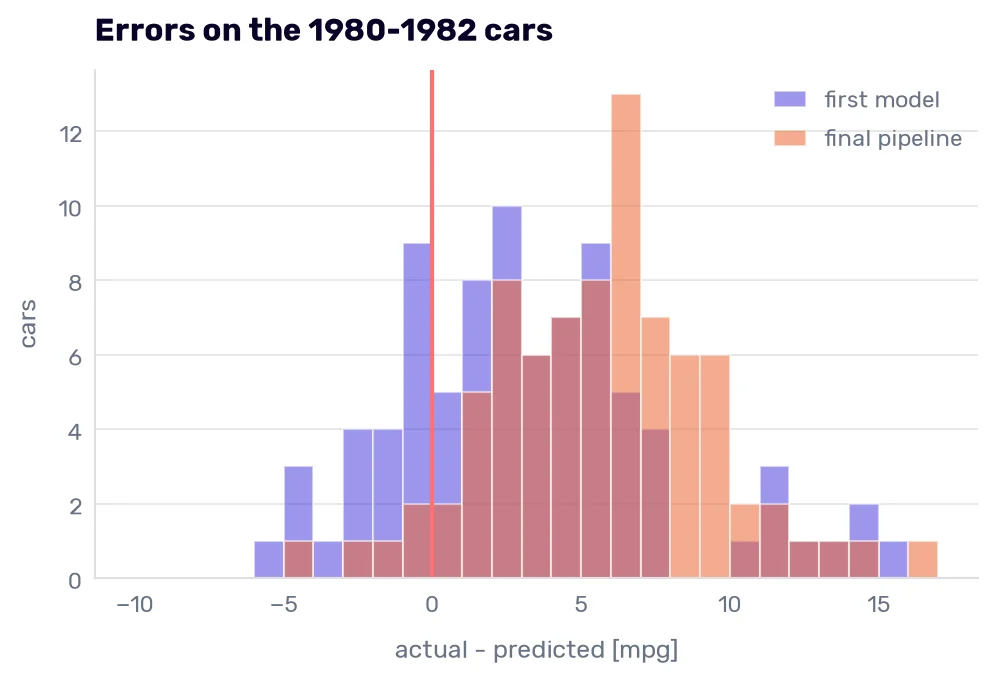
The first model’s errors center around 3 mpg. Ours sit around 6, and almost nothing lands left of zero. The model year added 0.52 mpg per year, and from 1980 to 1982 the trend it learned was still running. Without it, the pipeline predicts 1980s cars as if they were built in the late 1970s. The folds couldn’t show that cost, because they never asked about anything more than one year away.
These are the cars behind the biggest misses.
test_residuals = y_test - predictions
pd.DataFrame({
    'car name': X_test['car name'], 'actual': y_test, 'predicted': predictions, 'residual': test_residuals,
}).sort_values('residual', ascending=False).head(8).to_markdown()
| car name | actual | predicted | residual | |
|---|---|---|---|---|
| 394 | vw pickup | 44 | 24.66 | 19.34 |
| 326 | vw dasher (diesel) | 43.4 | 24.6574 | 18.7426 |
| 322 | mazda glc | 46.6 | 29.3301 | 17.2699 |
| 325 | vw rabbit c (diesel) | 44.3 | 27.2537 | 17.0463 |
| 387 | oldsmobile cutlass ciera (diesel) | 38 | 21.9756 | 16.0244 |
| 309 | vw rabbit | 41.5 | 26.6937 | 14.8063 |
| 327 | audi 5000s (diesel) | 36.4 | 23.057 | 13.343 |
| 333 | datsun 280-zx | 32.7 | 20.611 | 12.089 |
Four of the eight names say “diesel”. In the training data, one name did, the Volkswagen Rabbit we decided not to build a column for. Among the 85 cars from 1980-1982, six names have it, and the dataset still has no column for fuel type.
The 1980s names also hold three makes the encoder has never seen: “nissan”, “triumph”, and “vokswagen”. We know two of them. “vokswagen” is a misspelling of a make we know. “nissan” is the “nissan stanza xe”, and Nissan is the company that sold cars in the US as Datsun until the mid-1980s, so the same company appears under two names in our data. I didn’t read the 1980s names (Rule 14), so all three went into the infrequent bucket.
The Skodas in PCA space
In the data drift section, the model gave the Skodas 52.18 and 52.07 mpg, mostly from the model year. The final pipeline predicts them without it. The make “skoda” is unknown, so it goes into the bucket.
new_cars = pd.DataFrame([
    {'cylinders': 3, 'displacement': 60.9, 'horsepower': 74, 'weight': 1898,
     'acceleration': 12.8, 'model year': 119, 'origin': 2, 'car name': 'skoda citigo'},
    {'cylinders': 3, 'displacement': 60.9, 'horsepower': 94, 'weight': 2478,
     'acceleration': 10.2, 'model year': 125, 'origin': 2, 'car name': 'skoda scala'},
], index=['citigo', 'scala'])

final.predict(new_cars)
array([33.45814764, 26.97573039])
The pipeline predicts 33.46 mpg for the Citigo and 26.98 for the Scala, against real-world estimates of 38.3 and 37 mpg. The misses shrink from 14 and 15 mpg to 4.8 and 10, and they now point the same way as for the 1980s cars: newer than anything the model knows, and more efficient than it expects, which is why we dropped the year.
The Scala’s miss is still twice the Citigo’s. In the data drift section, I promised a picture that checks the columns together, which the range check couldn’t do. It’s a separate PCA with two components, standardized and fitted on the training cars only, over all five numeric columns, displacement included.
view = make_pipeline(StandardScaler(), PCA(n_components=2)).fit(X_train[numeric])
train_2d = view.transform(X_train[numeric])
test_2d = view.transform(X_test[numeric])
skodas_2d = view.transform(new_cars[numeric])

plt.scatter(train_2d[:, 0], train_2d[:, 1], alpha=0.5, label='train (1970-1979)')
plt.scatter(test_2d[:, 0], test_2d[:, 1], alpha=0.6, label='test (1980-1982)')
plt.scatter(skodas_2d[:, 0], skodas_2d[:, 1], marker='*', s=200, color='red', label='Skoda Citigo and Scala')
plt.title('Train, test, and the Skodas in the first two components', loc='left')
plt.xlabel('first component')
plt.ylabel('second component')
plt.legend()
plt.show()
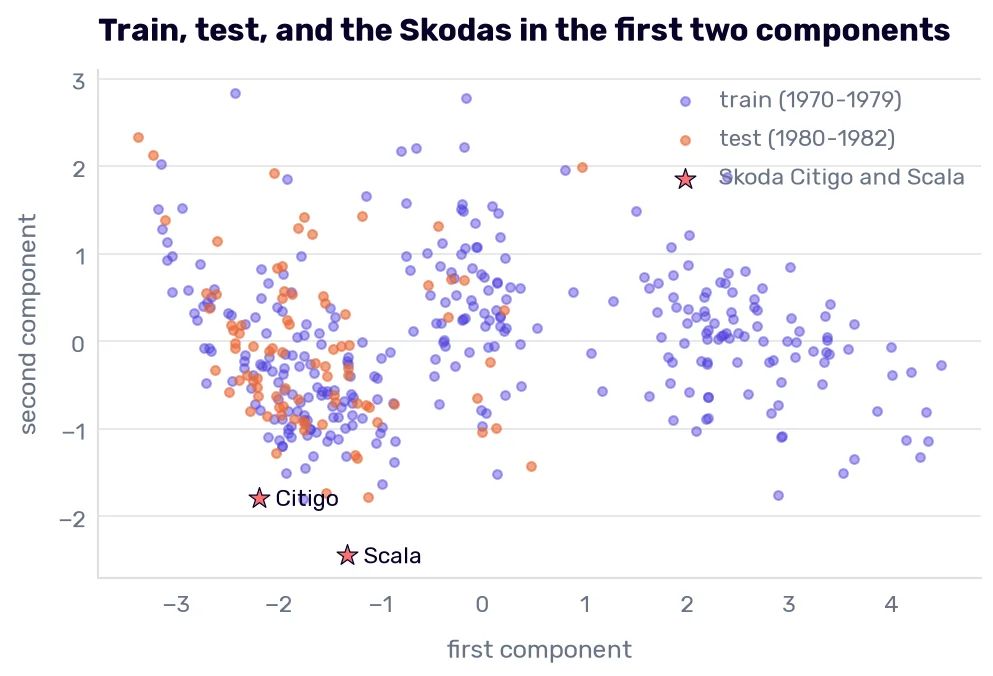
The 1980s cars pile up on the left, the small-car end of the first component, which is the covariate shift from the data drift section in one picture. They stay inside the training cloud, though.
The Citigo sits on the bottom edge of the cloud. The Scala sits below it. Its second component is −2.44, and the lowest training car is at −1.80. The second component is mostly acceleration, and a low value means a car that is quick for its size. A 2478-pound car with a 61-cubic-inch engine that gets to 60 mph in 10.2 s is a combination no 1970s car had, even though its weight, horsepower, and acceleration each pass the range check.
To find the training cars closest to each Skoda, we measure the distance in the standardized five columns.
standardized = view[0].transform(X_train[numeric])
for name, car in zip(new_cars.index, view[0].transform(new_cars[numeric])):
    distances = np.sqrt(((standardized - car) ** 2).sum(axis=1))
    print(name, X_train['car name'].iloc[distances.argmin()], round(distances.min(), 2))
citigo maxda rx3 0.55
scala mazda rx2 coupe 1.22
Both are rotary Mazdas. The closest thing in the training data to a modern 3-cylinder piston engine is a car whose “3 cylinders” were a placeholder for an engine with no cylinders at all.
We spent lots of time trying multiple ideas, and we still seem to be making little progress. Welcome to data science. I once spent half a day analyzing who buys a certain kind of service, back when I didn’t know much about the business yet. Picture the conversation:
“What is the result?”
“Well, the people who…” (here comes a description of a group) “…buy the most.”
“Yeah… great. That’s our largest segment of customers. Who besides them?”
“(another description)”
“So… the second-largest segment? Did you spend half of a day on that?”
The analysis was correct, and it said nothing new. At least it helped me notice that I didn’t have enough information to tell those customers apart in any meaningful way, and that I should spend more time adding new features to the dataset.
Our pipeline is in the same place. We encoded, extracted, selected, scaled, rotated, and bent the columns we have, and the worst misses on the 1980s cars are diesels in a dataset with no fuel-type column and a single diesel name in the training years. The closest neighbors of the Skodas are rotaries in a dataset with no engine type. No transformation of cylinders will ever say “rotary,” because the information isn’t in the column.
-
The feature importance section gave weight’s standard deviation as 881 lbs.
StandardScalerdivides by the number of rows, while pandas divides by the number of rows minus one, so the scaler gets 880 lbs. The difference matters only when you compare a scaler’s output with adescribe()table and wonder why the numbers are off. ↩